建表并插入数据
## 建表
create table if not exists student(
    s_id int(11) not null auto_increment comment '学号',
    s_name varchar(5) not null  comment '姓名',
    s_age int(3) not null  comment '年龄',
    s_sex int(1) not null  comment '性别',
    primary key (s_id)
)ENGINE=InnoDB DEFAULT CHARSET=utf8mb4 comment '学生表';
插入数据
#添加多行数据
insert into  student(s_id, s_name, s_age, s_sex) values
(default,'小兰',18,1),(default,'小白',20,0),(default,'小黑',25,0),(default,'小花',22,1),
(default,'张三',23,0),(default,'李四',20,0),(default,'翠花',19,1),(default,'大海',18,0);
跑
maven方式引入jar
<dependency>
      <groupId>junit</groupId>
      <artifactId>junit</artifactId>
      <version>4.11</version>
      <scope>test</scope>
    </dependency>

    <!-- https://mvnrepository.com/artifact/org.mybatis/mybatis -->
    <dependency>
      <groupId>org.mybatis</groupId>
      <artifactId>mybatis</artifactId>
      <version>3.5.6</version>
    </dependency>

    <!-- https://mvnrepository.com/artifact/org.projectlombok/lombok -->
    <dependency>
      <groupId>org.projectlombok</groupId>
      <artifactId>lombok</artifactId>
      <version>1.18.18</version>
      <scope>provided</scope>
    </dependency>

    <!-- https://mvnrepository.com/artifact/mysql/mysql-connector-java -->
    <dependency>
      <groupId>mysql</groupId>
      <artifactId>mysql-connector-java</artifactId>
      <version>8.0.23</version>
    </dependency>
创建实体类
//Data-->lombok 注解
@Data
public class Student {

    private Integer sId;
    private String sName;
    private Integer sAge;
    private int sSex;

}
mybatis-config.xml基础配置
<?xml version="1.0" encoding="UTF-8" ?>
<!DOCTYPE configuration
PUBLIC "-//mybatis.org//DTD Config 3.0//EN"
"http://mybatis.org/dtd/mybatis-3-config.dtd">
<configuration>
<settings>
<!-- 开启驼峰 -->
<setting name="mapUnderscoreToCamelCase" value="true"/>
</settings>
<!-- 配置环境 environments = 可以有多个环境 我们只配置一个-->
<environments default="development">
<!-- 配置 -->
<environment id="development">
<!--事务默认使用JDBC-->
<transactionManager type="JDBC"/>
<!-- 数据源 -->
<dataSource type="POOLED">
<!-- 数据库驱动 -->
<property name="driver" value="com.mysql.cj.jdbc.Driver"/>
<!-- 数据库url -->
<property name="url" value="jdbc:mysql://localhost:3306/gold?characterEncoding=utf8&useSSL=false&allowPublicKeyRetrieval=true"/>
<!-- 数据库用户名 -->
<property name="username" value="root"/>
<!-- 密码 -->
<property name="password" value="123456"/>
</dataSource>
</environment>
</environments>
<!-- mapper.xml的具体位置 -->
<mappers>
<mapper resource="mapper/StudentMapper.xml"/>
</mappers>
</configuration>
mapper接口
public interface StudentMapper {
    //查询全部
    public List<Student> allStudent();
}
mapper.xml
<?xml version="1.0" encoding="UTF-8" ?>
<!DOCTYPE mapper
        PUBLIC "-//mybatis.org//DTD Mapper 3.0//EN"
        "http://mybatis.org/dtd/mybatis-3-mapper.dtd">
<!-- 那个接口的mapper.xml -->
<mapper namespace="com.qc.mapper.StudentMapper">
    <!-- id:接口方法名称一样  resultType:数据库查询返回加过的类型  下面是sql语句 -->
    <select id="allStudent" resultType="com.qc.entity.Student">
        select * from student;
    </select>
</mapper>
创建测试类
    @Test
    public void allStudent(){
        try {
            //用mybatis自带的Resources读取mybatis-config.xml配置文件内的信息
            InputStream in = Resources.getResourceAsStream("mybatis-config.xml");
            //创建SqlSessionFactory工厂对象
            SqlSessionFactory sqlSessionFactory = new SqlSessionFactoryBuilder().build(in);
            //获得SqlSession
            SqlSession sqlSession = sqlSessionFactory.openSession();
            //通过SqlSession.getMapper  传入mapper.class 拿到mapper对象
            StudentMapper mapper = sqlSession.getMapper(StudentMapper.class);
            //运行方法,获得数据
            List<Student> students = mapper.allStudent();
            //遍历
            students.forEach(System.out::println);
        } catch (IOException e) {
            e.printStackTrace();
        }
    }
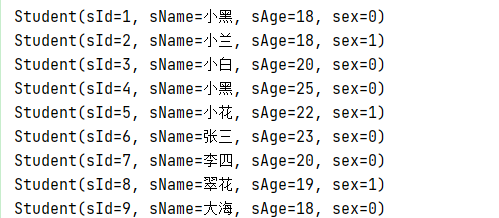
结果